A CRT filter is a visual effect, usually applied in an emulator or on modern hardware, that makes a digital image look like it’s being displayed on an old cathode ray tube television. It adds things like scanlines, a soft glow around bright pixels, and slight color bleeding. People want one because many retro games were built around how CRTs actually looked, and without that softening, the same games can look harsh, flat, or oddly broken on a modern screen.
§01What exactly does a CRT filter do to the image?
A CRT filter simulates the physical quirks of old tube televisions using software or hardware processing. The most recognizable part is scanlines — thin dark horizontal gaps between rows of pixels, mimicking the way a CRT actually painted an image line by line using an electron beam.
Beyond scanlines, a good filter typically reproduces several other CRT traits:
- Phosphor glow — a soft blur or halo around bright areas, since CRT phosphors didn’t switch on and off with hard edges.
- Color bleed — adjacent colors blending slightly into one another rather than staying in perfectly separate pixel blocks.
- Curvature — a gentle bowing of the image toward the edges, imitating the curved glass of an actual tube.
- Slight blur or softness — smoothing out the hard, stair-stepped edges that appear when low-resolution pixel art is shown on a sharp modern panel.
None of these are “damage” or flaws being added for nostalgia’s sake alone — they’re a reasonably faithful recreation of how the display technology itself behaved. For more on why this mismatch happens in the first place, see our explainer on why old games look wrong on a modern television.
§02Why did old games look different on a CRT in the first place?
Old games were designed and tested almost exclusively on CRT displays, so artists leaned on the CRT’s natural blur and glow to make limited pixel art read as smoother, richer images than the raw pixel grid actually contained.
Developers working with a small, fixed set of pixels and a limited color palette knew that a CRT would soften hard edges and blend dithered color patterns into something that looked closer to a gradient. Character sprites that look blocky and crude as raw pixel data were often designed with the expectation that the screen itself would smooth them out.
This is also why dithering — a checkerboard-like pattern of two colors used to fake a third — was such a common technique in that era. On a CRT, dithering blurred into a believable middle tone. On a modern flat panel showing the same raw pixels with total sharpness, that same dithering can look like visible speckling or noise instead of a smooth blend.
§03Why does the same game look worse on a modern TV or monitor?
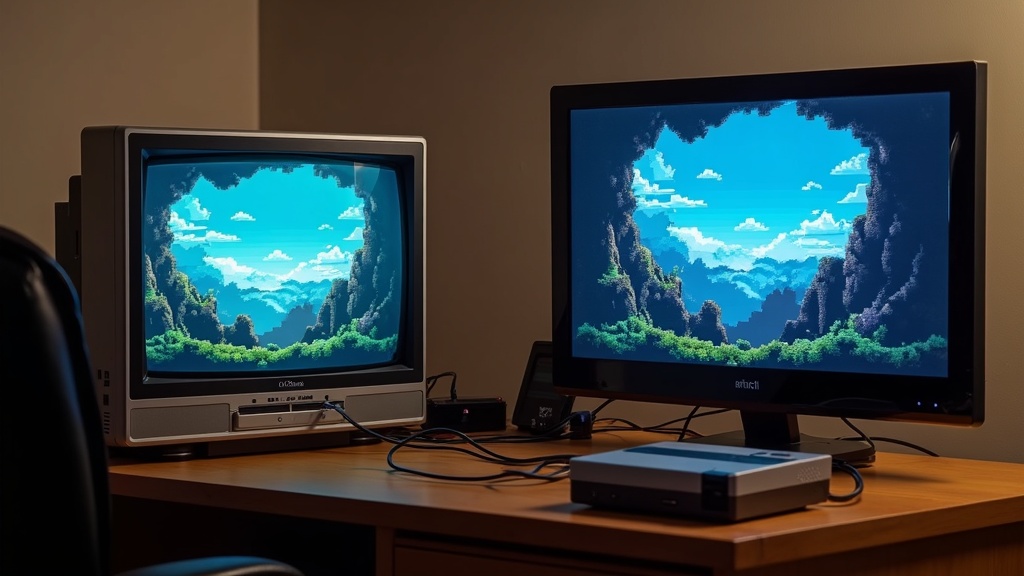
Modern displays show every pixel with perfect, hard-edged sharpness and no blending between them, which exposes the seams in old pixel art that a CRT used to hide. The image isn’t “worse” technically — it’s simply more literal than the artists ever intended it to be seen.
Modern LCD, LED, and OLED panels are built around a completely different goal: reproducing a signal as precisely and sharply as possible. That’s exactly the right approach for a modern high-resolution game, but it becomes a liability with older, lower-resolution content that was designed around a fuzzier, glowier canvas.
Old games are also frequently displayed today through upscaling, stretching a small number of original pixels across a much larger modern screen. Combined with the total sharpness of a modern panel, this can make each pixel look like a hard, visible square — an effect sometimes called the “screen door” or “chunky pixel” look. Our guide to what upscaling is and why every game uses it now covers the broader technique in more depth.
§04Do CRT filters actually make the game look better, or is it just nostalgia?
It’s a mix of both, and reasonable people land in different places. For games explicitly designed around CRT display behavior, a filter can genuinely restore intended visual effects; for other players, the appeal is simply the emotional pull of recreating how the game looked in memory.
There’s a real technical case for CRT filters: certain visual tricks only work because of how a CRT rendered them. Transparency effects, fine dithering patterns, and some deliberate flicker-based techniques were built assuming the display would blend and soften them. Turning those effects off, or viewing them at full unfiltered sharpness, can genuinely change how the artwork reads.
There’s also a nostalgia case, and it’s not a lesser one — plenty of players simply want the game to look and feel the way it did on the television they grew up with. That’s a legitimate reason to want a filter even if it isn’t strictly “more accurate” in every case.
Where this becomes genuinely contested is intensity. Some players want a strong, obvious CRT effect with heavy scanlines and visible curvature; others want the subtlest possible hint of softness, arguing that an aggressive filter is its own kind of distortion. Neither side is simply wrong — it comes down to personal taste and which game is being played.
§05How do you actually get a CRT filter — do you need an old TV?
You don’t need a real CRT television. Most modern retro gaming happens through software filters, either built into an emulator or applied by a modern console or handheld, though a small niche of enthusiasts do still use actual CRT hardware.
The most common routes are:
- Emulator shaders — Many emulation programs include CRT-style shader options that can be toggled on, with sliders for scanline strength, curvature, and glow. This is the cheapest and most flexible option, and it’s the route most players trying emulation for the first time will encounter. Our guide to what emulation is and how it actually works explains the basics if this is unfamiliar territory.
- Built-in console features — Some modern mini-consoles and official rerelease compilations include a CRT filter as a display option in their settings menu.
- Dedicated hardware scalers — Enthusiasts chasing very low input lag and precise filter control sometimes use standalone video processing devices that sit between an original console and a modern display, applying scanlines and other effects in real time.
- An actual CRT television — A genuine vintage CRT is still the reference point some collectors chase, usually paired with original hardware. This is a smaller, more dedicated hobby involving sourcing, testing, and maintaining aging equipment.
For most players, a shader inside an emulator or a filter option on a modern rerelease is by far the simplest way to try the look without hunting down old hardware.
§06Are there downsides to using a CRT filter?
The main downsides are a slight loss of raw image clarity, the processing overhead some filters add, and the fact that a strong filter can occasionally fight against a game’s original art rather than enhance it. It’s a setting worth adjusting, not a rule to apply blindly.
Heavier filter settings — thick scanlines, strong curvature, aggressive glow — can make fine detail harder to read, particularly on smaller screens or handhelds. Some players find a strong filter tiring to look at for long sessions.
There’s also a performance consideration on lower-powered hardware. Shader-based filters require some processing work, and on weaker devices this can occasionally introduce input lag or minor stutter, which matters more for fast, reflex-driven games than slower-paced ones. Anyone sensitive to responsiveness may want to read up on what input lag is and how to reduce it before turning filters up to maximum.
Finally, not every game benefits equally. Games with detailed, high-resolution 2D art or later-era 3D games designed with anti-aliasing and cleaner lines in mind generally don’t need — and may not look better with — a heavy CRT effect. It tends to matter most for earlier, lower-resolution pixel art from consoles and arcade cabinets built before high-definition displays existed. Our broader look at how arcades shaped the games we play today touches on how much of that early visual style was built around specific display hardware of the time.
§07Is this just a retro gaming thing, or does it matter for buying decisions too?
It’s mostly a retro and preservation topic, but it does intersect with buying advice — whether a rerelease or remaster includes CRT filter options is a genuine factor in judging whether that version is a faithful presentation of the original game.
When a classic game gets a modern rerelease, one of the fairer questions to ask is whether the developers bothered to include a CRT or scanline option at all, and how well it’s implemented. Some official rereleases include thoughtful, adjustable filters; others skip the option entirely and leave the game looking noticeably different from how it originally appeared. That’s a reasonable thing to weigh alongside performance and extra content when deciding if a remaster is actually worth buying over the original.
It also connects to the larger conversation around game preservation. A CRT filter isn’t just a cosmetic toy — for some games, it’s arguably part of accurately preserving the intended experience, not merely decorating it. That’s part of why the topic comes up frequently in discussions of why preserving old video games is so difficult, since display behavior is just as much a part of the original experience as the code itself.
For readers who want to go further, the wider category of retro and preservation coverage and the gaming hardware guide hub both dig into related display and hardware questions in more detail.